
Enemies that chase when close
By the end you will have ghosts that ignore the hero from far away, then give chase when the hero comes near.
What you need
The movement way is Simple. The rule way needs Advanced for Step towards another object.
| Hero | Hero (top-down) from the library, in a level with Gravity pulls set to Off (everything floats). |
|---|---|
| Ghost | Ghost from the library. Its card says "Set who it chases in its movement settings." |
| Walls | Dungeon Floor tiles. Chasers slide along solid walls. |
| Sound | Lose. |
Way 1: the movement setting
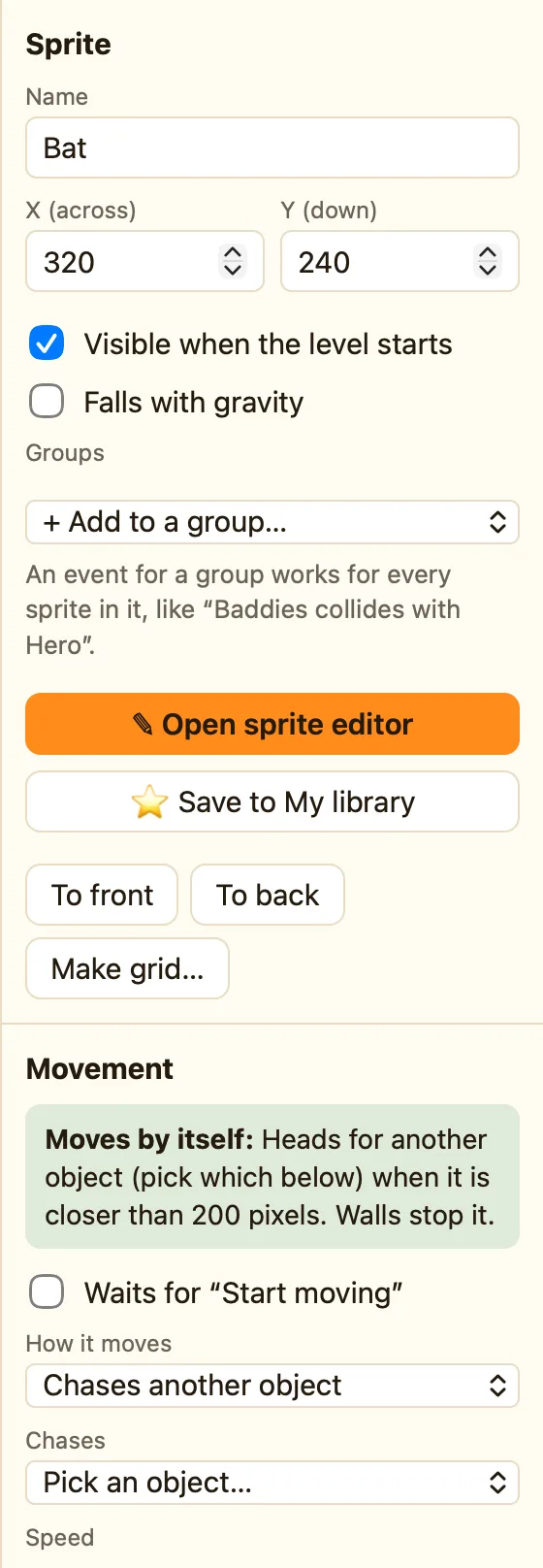
- Click the Ghost. Under Movement, How it moves is Chases another object.
- Set Chases to Hero (top-down). Set Speed to 12.
- Set Only when closer than to 170 pixels. 0 would mean always.
- Events tab → + New event → Hero → Collides with another object → Ghost. Do Subtract lives 1, Set position of Hero back to the start, Flash (blink) 1.5 seconds, play Lose.
- Press ▶ Play level. Walk towards a ghost slowly. At 170 pixels it wakes up.
WhenHero collides with Ghost
DoSubtract 1 from livesSet position of Hero to (48, 60)Hero flashes for 1.5 secondsPlay sound Lose
Way 2: a rule
Use this when the enemy already has another movement, like Patrols back and forth, and should only chase sometimes.
- Set the Ghost's How it moves to Stays still.
- + New event → Ghost → Is near another object. Near: Hero. Closer than (pixels): 170.
- In the Ghost cell choose Step towards another object. Towards: Hero. Step (pixels): 2.
WhenGhost is closer than 170 pixels to Hero
DoGhost steps 2 pixels towards Hero
Only the close ghosts are picked, so far-away ones stay put. The step happens every moment, so 2 pixels is a steady creep and 4 is a sprint.
Make it yours
- A wake-up sound: Is near + Only once while this keeps happening → play Spooky tune.
- Give up: a second rule with NOT Is near → Stop Ghost.
- With ƒx (Advanced): Compare two values
Distance(X("Ghost"), Y("Ghost"), X("Hero"), Y("Hero"))< less than 170 does the same as Is near.
