
The door will not open
In your 3D level you walk up to a door, press Space, and it stays shut.
Check these first
- Are you facing it? Doors open from the square right in front of you. Turn with ← → until the door fills the middle of the view, then press Space.
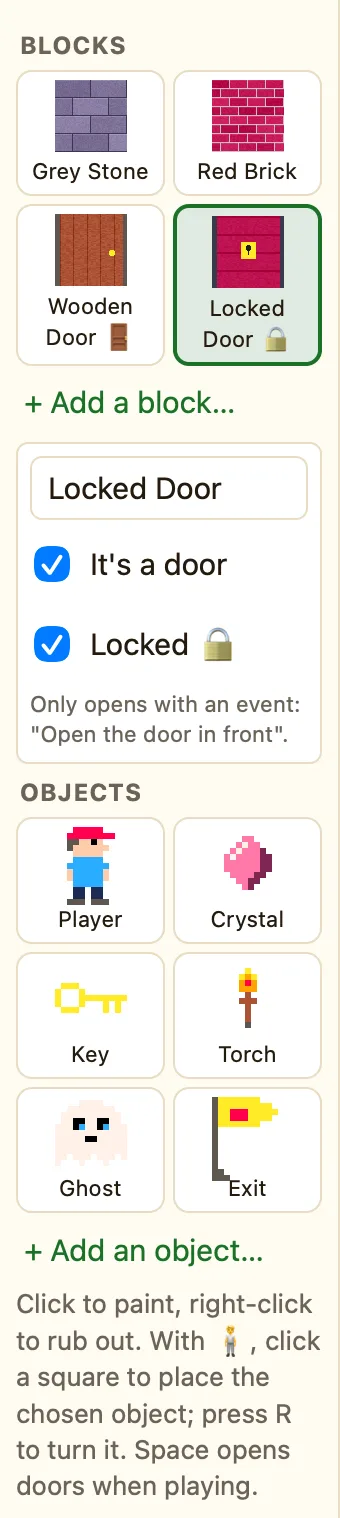
- Is it a door at all? In the map editor, click the block in the Blocks palette. It's a door must be ticked. Wooden Door and Metal Door from the library are doors; Grey Stone is a wall.
- Is it locked? A block with Locked 🔒 ticked never opens with Space. It only opens when a rule says Open the door in front. Add one: Upon pressing key Space + Compare counter Keys > more than 0 → Player: Open the door in front.
- Is the player the one looking? See through the eyes of in the level settings must be the First-person sprite that stands at the door.
WhenUpon pressing SpaceKeys > 0
DoOpen the door in front of Player
Why it happens
Space opens the door in front of the player, and only that one. A locked door is different on purpose. NutHouse never opens it by itself, so your rule decides when, like after the key is found. The help line in the map editor says it: "Space opens doors when playing."
