
The screen does not scroll
You made a long level, but when you play the hero walks off the side of the screen instead of the screen following.
Check these first
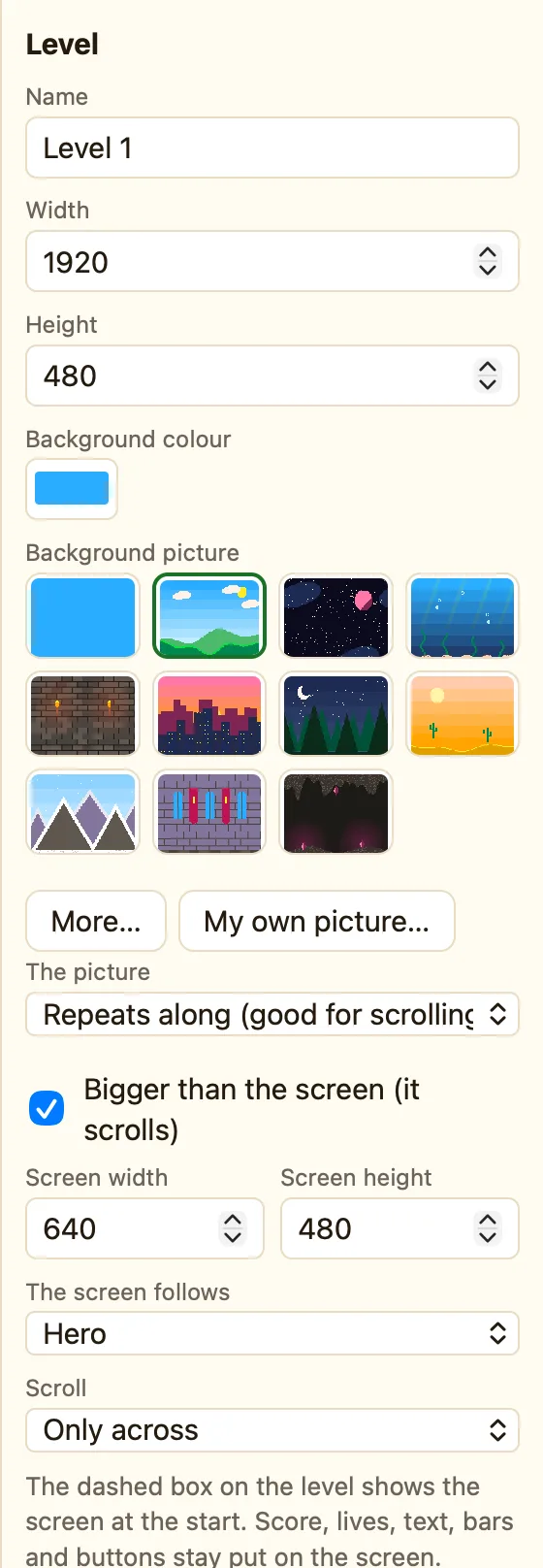
- Is scrolling on? Click empty space in the level. In the Properties panel, tick Bigger than the screen (it scrolls).
- Is the screen smaller than the level? Under that tick box, set Screen width and Screen height. If they are the same as Width and Height, there is nothing to scroll.
- Who does the screen follow? Set The screen follows to your hero. Nothing (use events to move it) means the screen only moves when a rule says Make the screen follow an object or Move the screen to a spot.
- Right direction? Check Scroll: Only across will not scroll up and down.
- Did a rule stop it? Search the Events tab for Stop the screen following.
- Is the level really big? Press Fit. If the dashed yellow Screen box covers the whole level, make the level wider.
Why it happens
A level and the screen are two different sizes. Without Bigger than the screen ticked, NutHouse shows the whole level at once and nothing moves. With it ticked, NutHouse needs to know which object to keep in view, and that is The screen follows.
