
A tour of the sprite editor
Draw your own pixel art: a pencil, an eraser, shapes, a paint bucket, a colour picker, and buttons to flip and turn.
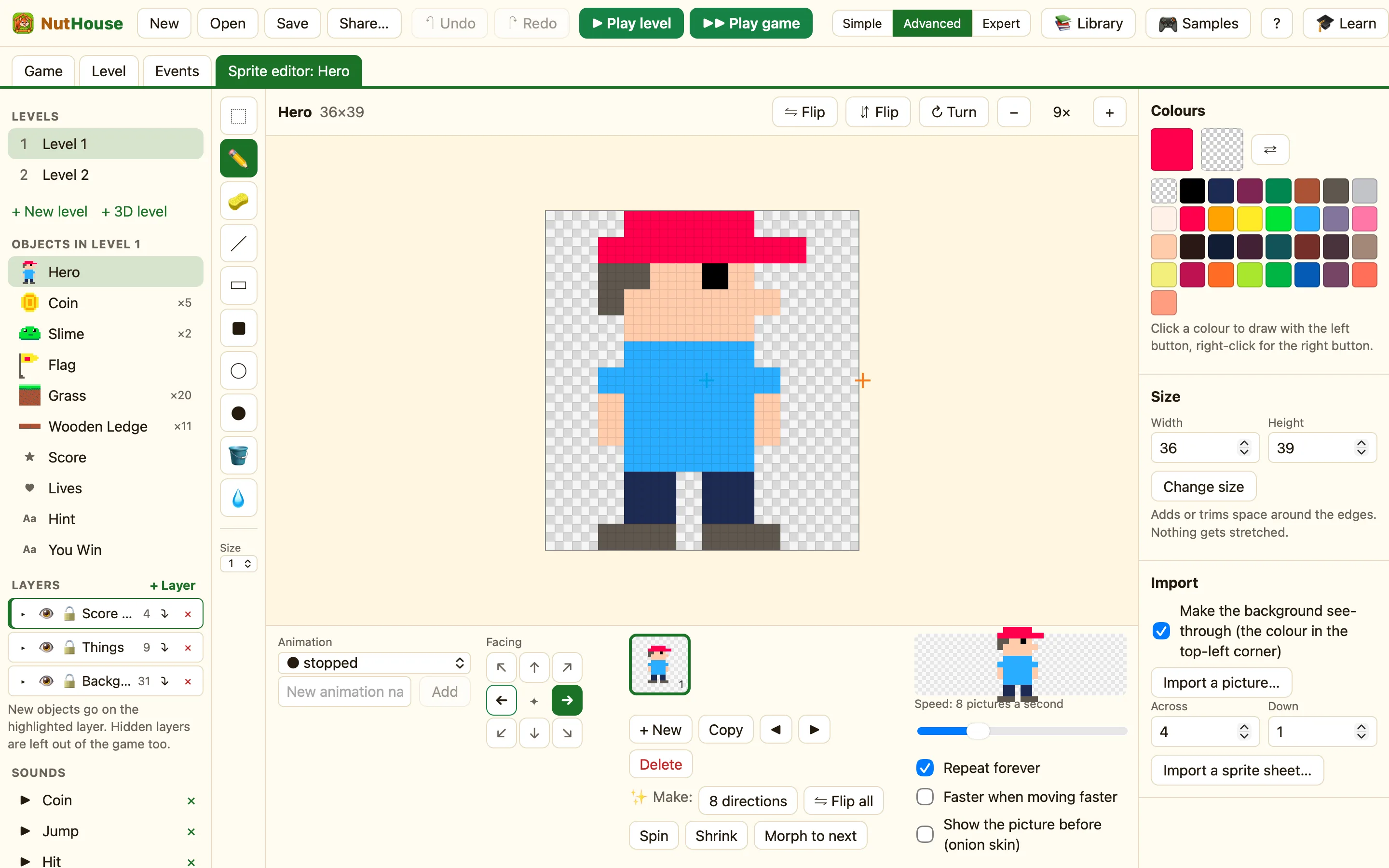
Opening it
Double-click a sprite in the Level tab, or double-click its name in the sidebar, or click ✎ Open sprite editor in its settings. A new tab appears at the top: Sprite editor: Hero. Backgrounds open here too.
Every change is a step you can undo with ⌘Z. Changes go straight into your game. There is no save button for a picture.
The parts
The tools run down the left. The picture is in the middle, zoomed in so each pixel is a big square. A chequered area means see-through. The animation strip sits underneath, with one thumbnail per picture. The side panel on the right holds Colours, Size and Import, plus Points in Expert mode.
What the tools do
| ⬚ Select S | Drag a box round some pixels, then drag to move them. ⌘C copies, ⌘V pastes. |
|---|---|
| ✏️ Pencil B | Draws one dot at a time. Drag to draw a line of dots. |
| 🧽 Eraser E | Makes pixels see-through. |
| ╱ Line L | Drag from one end to the other for a straight line. |
| ▭ Box R · ■ Filled box ⇧R | Drag a rectangle, outline or solid. |
| ◯ Circle O · ● Filled circle ⇧O | Drag an oval, outline or solid. |
| 🪣 Paint bucket G | Fills an area of one colour with the colour you chose. |
| 💧 Colour picker I | Click a pixel to make its colour your drawing colour. |
| Size | Brush size 1 to 4. Press [ and ] to change it. |
In Expert mode two more tools appear for sprites: the hot spot and the action point. See Hot spot and action point.
The top bar
| ⇋ Flip | Flips the picture left to right. |
|---|---|
| ⇵ Flip | Flips it upside down. |
| ↻ Turn | Turns it a quarter turn. |
| − N× + | Zoom out and in. The number is how many screen pixels one picture pixel takes. |
With a selection, the bar also shows Copy, Cut, Rub out and Paste.
