
Make a 3D maze, start finish
Build a whole 3D maze from nothing: paint the map, add doors, a player, crystals and a key, then write the rules that make it a game.
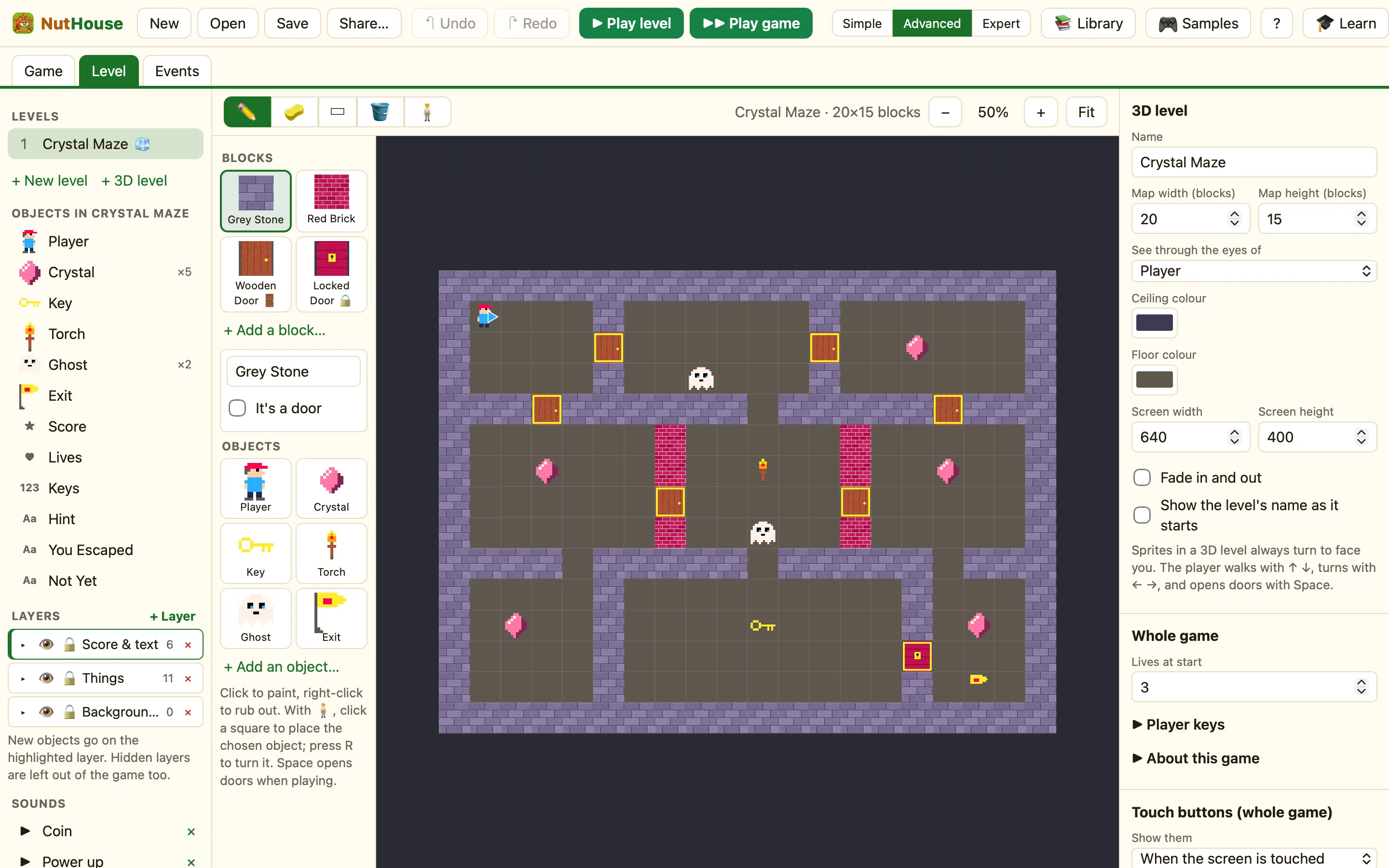
What you are making
A maze you walk through in first person. Crystals to collect, a key that opens a locked door, and an exit that only works when every crystal is gone. It is a smaller Crystal Maze 3D, and you make it in about twenty minutes.
Part 1: the map
- Choose Advanced on the toolbar.
- Click New (⌘N) to start an empty game.
- In the sidebar click + 3D level. NutHouse makes a 16×16 room ringed with Grey Stone, with a Player in the corner.
- Click Grey Stone in the Blocks palette and choose ✏️ Paint blocks.
- Paint walls inside the room to make corridors. Leave the paths two squares wide so there is room to turn. Right-click rubs out.
- Leave two small rooms with a single way in each. One is the key room, one is the exit room.
Part 2: doors
- Click + Add a block…. The Library opens on 3D walls. Click Wooden Door. NutHouse says “Wooden Door is ready to paint on 3D maps”.
- Click + Add a block… again and pick Locked Door.
- Paint a Wooden Door across a corridor. Doors go in a gap in a wall, with wall on both sides.
- Paint the Locked Door in the only gap into the exit room. Leave the key room open.
Part 3: the player
NutHouse already gave you a Player with First-person (3D levels) movement. If you deleted it, click + Add an object…, pick Hero from the Library, then in How it moves choose First-person (3D levels).
- Choose 🧍 Place and move objects.
- Drag the blue arrow to the start square and press R until it faces down the first corridor.
- Press ▶ Play level (⌘R) and walk the maze. Press Space at the wooden door. Press Esc to stop.
Part 4: crystals, a key and an exit
- Click + Add an object… and pick Crystal. With 🧍, click five or six squares around the maze.
- Click + Add an object… and pick Key. Place one copy in the key room.
- Click + Add an object… and pick Flag. Place it behind the locked door. Rename it Exit in the Properties panel.
- Click + Add an object…, open the New tab and pick Counter. Name it Keys and set Label in front to Keys: . Drag it to the top of the screen.
- Add a Score the same way.
Part 5: the rules
Open the Events tab and click + New event for each of these.
Picking up a crystal. Click Player, choose Collides with another object, pick Crystal.
Picking up the key. The same again, but with the Key, and the Keys counter goes up by one.
Opening the locked door. In ⌨ Keyboard & mouse choose Upon pressing a key and press Space. Click + and…, click Keys and choose Compare the counter: > more than 0. In the Player's cell, open the 3D sub-menu and add Open the door in front.
The exit. Player collides with Exit, plus Compare the number of these objects on Crystal: = equal to 0.
With one level, Next level ends the game and shows The End. Add a second level later and it carries on instead.
Part 6: play it
- Press ▶▶ Play game (⇧⌘R).
- Collect the crystals, find the key, stand in front of the locked door and press Space.
- Walk into the flag. If a crystal is left, nothing happens. Go and find it.
- Press Save (⌘S) and give your maze a name.
