
The sidebar
The column on the left of the Level tab: your levels, the objects in this level, its layers, and its sounds.
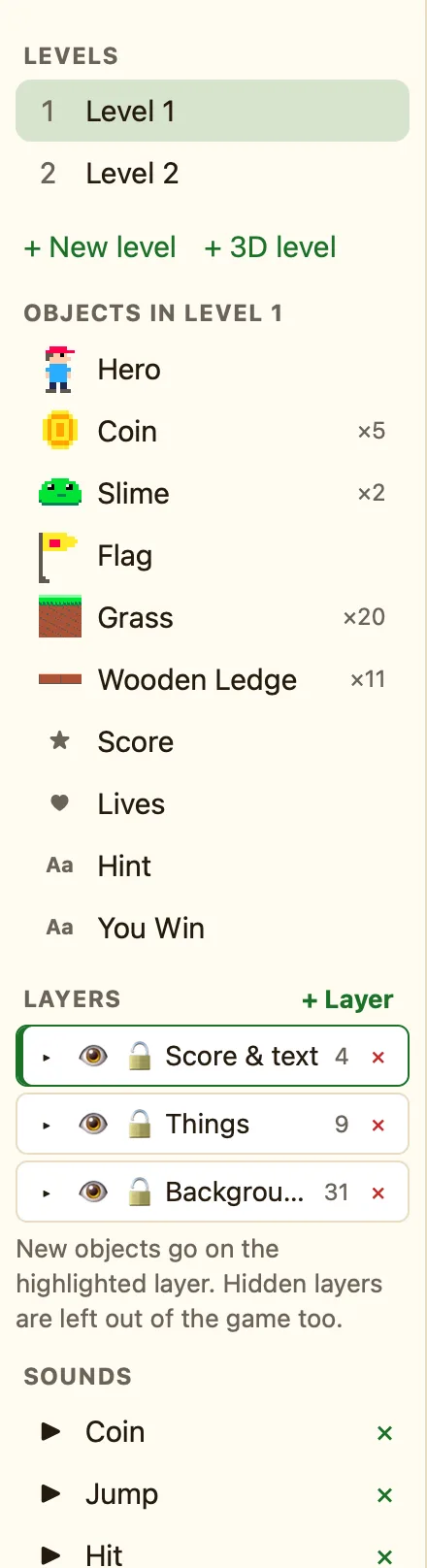
Levels
Every level, numbered. 3D levels get a 🧊. Click one to build it. Underneath are + New level and, in Advanced mode, + 3D level: a first-person level you walk around inside.
Objects in this level
Every kind of object in the level, with ×N when there are copies. Forty bricks show as one Brick ×40, because every copy shares the same name and settings.
| Click | Selects every copy of that object in the level. |
|---|---|
| Double-click | Opens it in the Sprite editor. |
| “None yet.” | The level is empty. Press + Add object above the level. |
Layers
Layers are like sheets of glass stacked up. Put the ground on one and the baddies on another, so you never nudge the wrong thing. + Layer adds one in front. Each row has 👁 to hide, 🔒 to lock, and a count of its objects. New objects go on the highlighted layer. Hidden layers are left out of the game too. See Layers.
Sounds
The sounds this game can play. Each has ▶ to hear it and ✕ to remove it. A rule can only play a sound that is in this list.
| + Built-in sound | Pick from NutHouse's 17 sounds, like Coin, Jump and Win. |
|---|---|
| + Import… | Your own .wav, .ogg or .mp3, up to 2 MB. |
How to select every copy of an object
- In the sidebar, under Objects in your level, click the object's name.
- Every copy in the level lights up. The right side says how many are selected.
- Press Delete them to remove them all, or drag one to move them all together.
