
Fade in and show the level name
Two tick boxes make your game feel finished: a gentle fade between levels, and the level's name on screen as it starts.
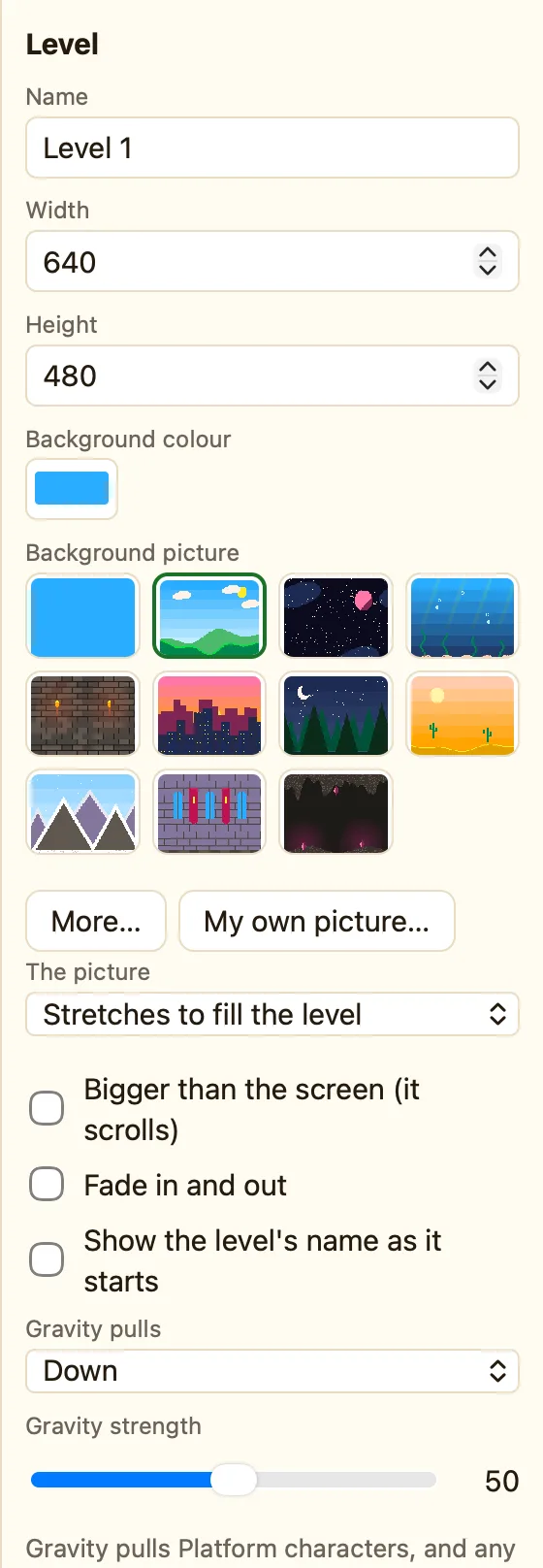
What they do
| Fade in and out | The level starts black and fades up. When the player leaves, it fades back to black before the next level appears. |
|---|---|
| Show the level's name as it starts | The Name from the top of the panel appears in the middle of the screen for a moment, then goes. |
Both are off in a new level. They are settings of each level, so you can fade some levels and not others.
How to turn them on
- Open the level and click empty space.
- Change Name to something good, like The Dark Forest. That is what the player will read.
- Tick Fade in and out.
- Tick Show the level's name as it starts.
- Press ▶▶ Play game to see the whole thing with the fades.
3D levels have the same two tick boxes, under the ceiling and floor colours.
Where this helps most
A game with five levels feels like one long level if they snap from one to the next. The fade gives the player a breath. The name tells them they got somewhere.
Name your levels like chapters: 1. Sunny Hills, 2. Night Forest. The name shows exactly as you typed it, so keep it short.
