
Put your game online
Give a game its own web page, with a link anyone can open, or a place in the gallery.
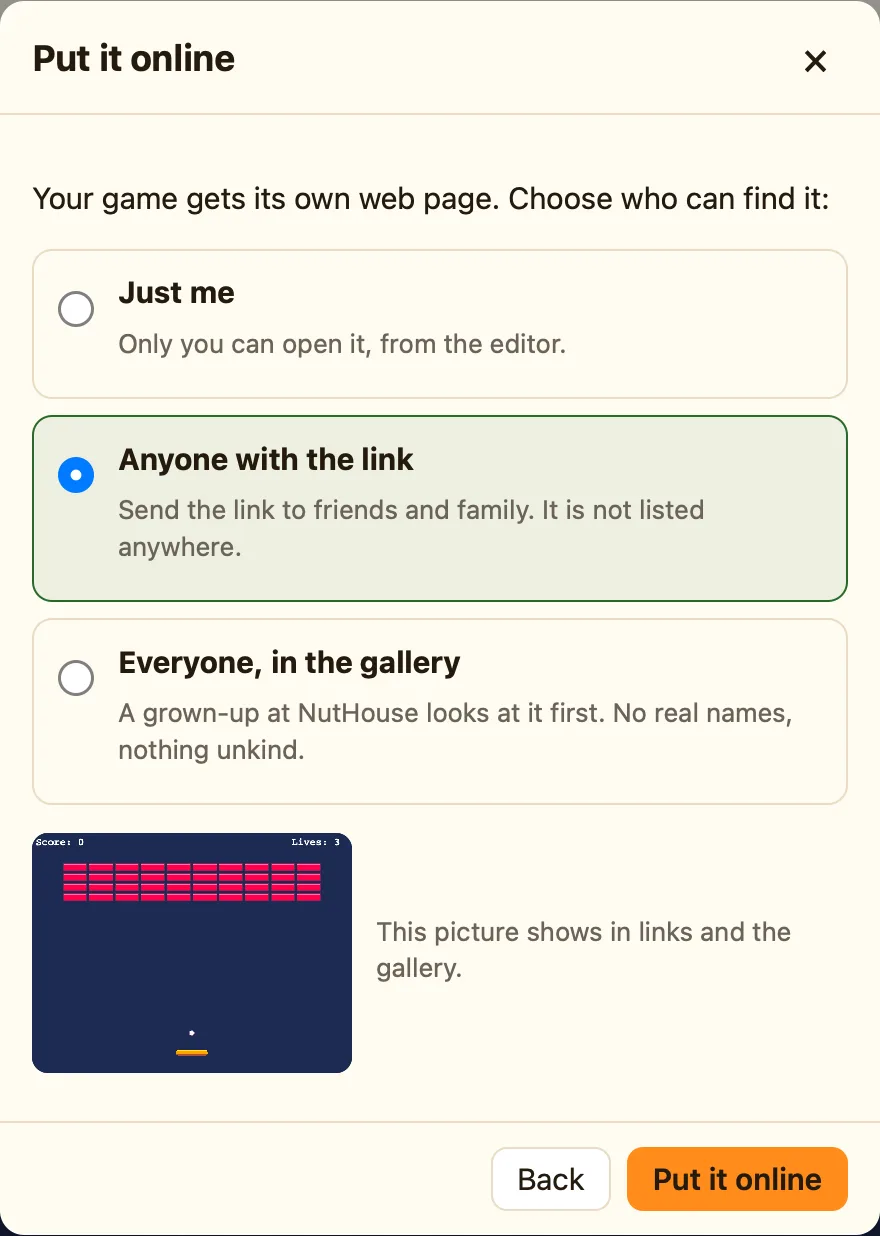
How to
- Sign in and save the game online.
- Press Share…, then Put it online….
- Choose who can find it (below). NutHouse makes a picture of your first level for the link.
- Press Put it online. You get a link like app.playnuthouse.com/play/k7m2x9pq4r. Press Copy and send it.
Who can find it
| Just me | Only you, from the editor. This is how every game starts. |
|---|---|
| Anyone with the link | Whoever has the link can play. It is not listed anywhere and search engines are asked to ignore it. |
| Everyone, in the gallery | The link works at once, and the game joins the Games page once a grown-up at NutHouse has looked at it. |
What players see
The start screen with the game’s name, by your nickname, How to play if you wrote it, and Tap to play. Sound and full-screen buttons in the corner, a small Made with NutHouse bar at the bottom with a Report link. On a phone or iPad, touch buttons. It is the same page as a shared .html file, just hosted.
Changing it later
Saving the game does not change the page players see. Press Put it online again to send the newest version. Choosing Just me takes the page down.
Remixing
Games in the gallery have a Make your own version link at the bottom of their page. It opens a copy in the editor, with the original maker’s name kept in About the game. Save it and it is yours to change; the original is not touched. Games shared only by link cannot be copied this way.
High scores
If the game has a high-score table, it lives online: everyone who plays from the link sees the same table. Players type a name of up to 12 letters; rude ones are swapped for PLAYER.
