
How movements work
Give a sprite a movement and it already knows how to walk, fly or chase. Your rules add the ideas on top.
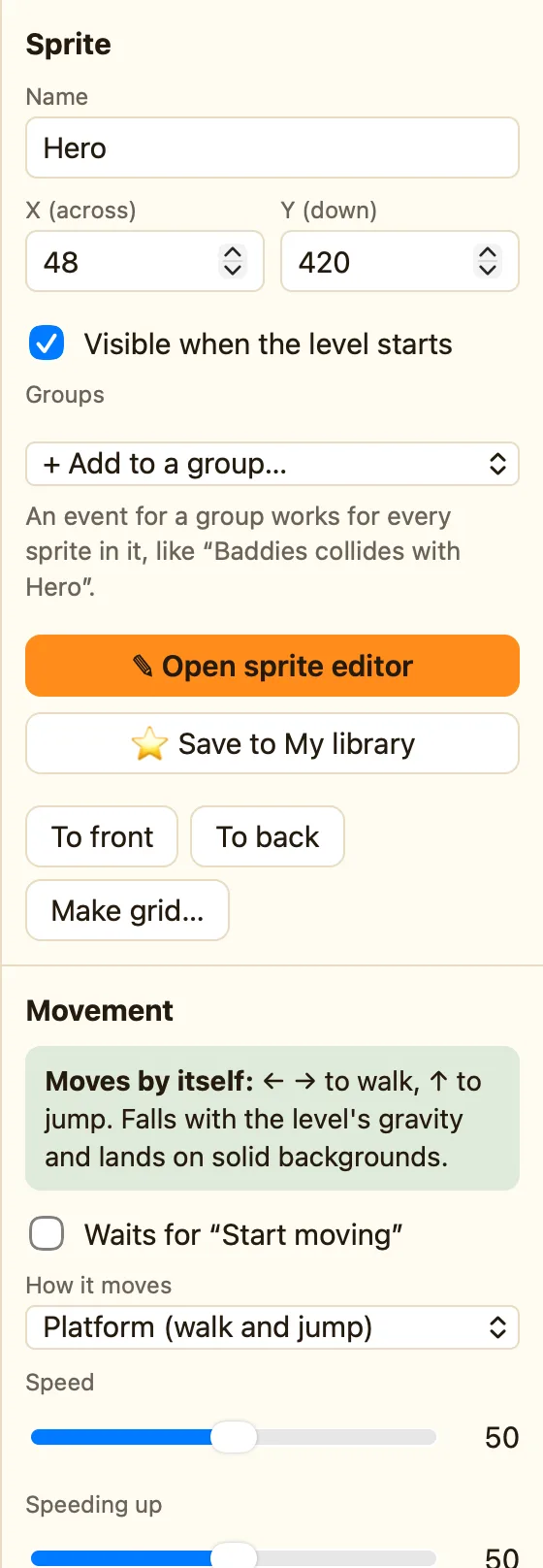
What a movement is
A movement is a ready-made behaviour. It is the bit of a sprite that moves by itself, or listens to the keys, without you writing a rule.
Every sprite has exactly one movement. Pick it from How it moves in the Movement section. The green banner above it tells you what the sprite will do: Moves by itself: or No movement:.
Rules go on top. The Platform movement makes the hero walk and jump. A rule makes the coin disappear when the hero touches it. Movement and rules work together.
The ten movements
| Stays still | Does not move by itself. Move it with rules. |
|---|---|
| Arrow keys (8 directions) | The player steers it with the arrow keys. |
| Platform (walk and jump) | Walks, jumps, falls and climbs ladders. |
| Bouncing ball | Flies in a straight line. Bounces when a rule says so. |
| Patrols back and forth | Walks left and right by itself, turning at walls. |
| Chases another object | Heads for the nearest copy of another object. |
| Racing car (seen from above) | Steers like a car seen from above. Advanced. |
| First-person (3D levels) | You see through its eyes in a 3D level. Advanced. |
| Follows a path | Moves along points you set. Advanced. |
| Follows the mouse | Sticks to the mouse pointer. Advanced. |
How to change a sprite's movement
- In the Level tab, click the sprite. Its settings appear on the right.
- Find the Movement section and open How it moves.
- Pick a movement. Its own settings appear underneath, like Speed.
- Press ▶ Play level (⌘R) to try it. Press Esc to stop.
Every copy of a sprite shares the same movement and settings. Change the Slime once and every Slime changes.
Movements pick animations too
A moving sprite plays its walking animation. A still one plays stopped. Platform sprites also use jumping, falling and climbing, and a ball uses bouncing. If an animation is empty, NutHouse uses stopped instead. See Animations.
